Lecture 1 How Computers Work
How Computers Work
Memory Layout
-----------------
|      0x0      |
|      0x1      |
|      0x2      |
|      0x3      |
|      ...      |        ^
|      0xF      |        |
-----------------      stack

  | | | | | | |    (64-bit: 8-bytes 'wide')
Data Types
Integers
| Type | Storage size | Value range |
|---|---|---|
| char | 1 byte | -128 to 127 or 0 to 255 |
| unsigned char | 1 byte | 0 to 255 |
| signed char | 1 byte | -128 to 127 |
| int | 2 or 4 bytes | -32,768 to 32,767 or -2,147,483,648 to 2,147,483,647 |
| unsigned int | 2 or 4 bytes | 0 to 65,535 or 0 to 4,294,967,295 |
| short | 2 bytes | -32,768 to 32,767 |
| unsigned short | 2 bytes | 0 to 65,535 |
| long | 8 bytes | -9223372036854775808 to 9223372036854775807 |
| unsigned long | 8 bytes | 0 to 18446744073709551615 |
Pointers
- Need to be able to store an address (so 8bytes for a 64-bit machine)
Endianness
Big endian is normal, little endian is backwards
x86is little endian, so are most linux systems, ARM- AIX and Power7 are big endian
- Some processors can be either mode - generally you can only control this at boot in protected modes
- All network protocols are defined in big-endian
- Most modern file system are endian independent (eg.UFS is not)
- Registers don’t have an endianness (They don’t fit into memory as a strip: there’s no concept of L/R)
-
Endianness only applies to integers
- You can’t convert from an int to a short in big endian - a problem when moving to 32bit computing from 16bit.
- Crashes due to automatic misconversions
Arrays
- Just lists of the same type
- Strings are always from lowest byte to highest byte
structs: Usually compilers byte-align and potentially reorder to conserve space
Stack
- Stack Frames
- Each function has it’s own stack frame which is created and used by the function
eipis the next instruction to be executedespis the top of the Stackebpis the base pointer: pointing to the bottom of the stack frame
Heap
- Storage that persists even after functions returned (i.e. malloc)
- On Linux by default, every process has only 1 thread
- On Windows every process has multiple threads, and every thread has it’s own heap
Memory Permissions
rwx
- Each piece of memory has some permissions associated with it
| Data | Permissions |
|---|---|
| Stack | rw- |
| Code | r-x |
Virtual memory
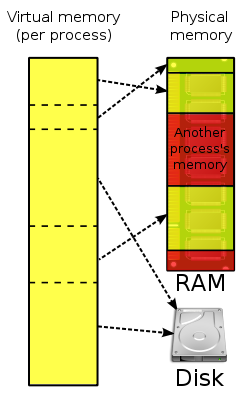
- Each process thinks it has the entire address space
- Virtual paging handled by the kernel to map virtual memory to physical memory
- The areas that are unused by a process are usually not mapped
- Hardware component is controlled by the kernel and provides extremely fast mapping
- Mapped in ‘pages’ which is 4KB
- Kernel keeps track of which physical pages are mapped to which virtual pages
- Permissions are applied per section or per page
- Each section is minimum 1 page
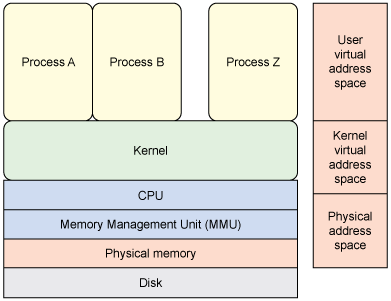
x86uses a two-level page table structure using MMU
Kernel space & User space
-
Syscalls trigger a transfer to kernel space
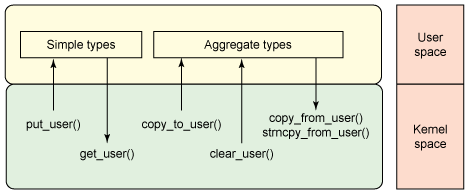
- Real Split
- A split of memory, where a section of memory is reserved for the system, and the remainder is user space
- User processes can’t read/write from the kernel space
- System Memory is uniform (i.e. same system memory will be in the same place in each virtual memory region - i.e. for each process).
- Alternative method is to have a separate virtual memory space for kernel space
Some Reading Suggestions
- Page Tables
- A Guide to Kernel Exploitation - Part of chapter on Attacking the Core
- The Shellcoder’s Handbook 2nd edition
- Bug Hunder’s Diary